
Walking into a shop and saying “I need Epson ink” is like asking for “car parts”—the response will be “which model?” Every Epson EcoTank printer uses specific ink series, and using the wrong one damages your printer. If you’ve ever stood confused in front of shelves of identical-looking bottles wondering which fits your L3150, this guide eliminates the guesswork.
Here’s how to identify exactly which Epson toner cartridge your printer needs—in under 2 minutes.
Quick Compatibility Finder
The fastest way to find your ink: locate your printer model number (on the front panel or top cover), then check the table below:
| Your Printer Model | Ink Series Needed | Price (KSh) | Shop Now |
|---|---|---|---|
| L100, L110, L120 | T6641-T6644 | 1,600 | T6641 Black |
| L200, L210, L220 | T6641-T6644 | 1,600 | T6641 Black |
| L300, L310, L350, L355, L360 | T6641-T6644 | 1,600 | T6641 Black |
| L3110, L3150, L3160 | 103 | 1,800 | 103 Black | Cyan |
| L3050, L3060, L3070 | 108 | 2,500 | 108 Black | Cyan |
| L4150, L4160 | 101 | 2,000 | 101 Black 127ml |
| L6160, L6170, L6190 | 101 | 2,000 | 101 Cyan | Magenta |
| L15150, L15160 | 108 | 2,500 | 108 Magenta | Yellow |
| L5190, L5290 | 112 | 2,200 | 112 Black | Cyan |
| L1250, L3250, L3260, L5296 | 115 | 2,300 | 115 Black | Cyan |
Can’t find your model? Call 0711258051 for instant compatibility confirmation.
Where to Find Your Printer Model Number
Before ordering ink, verify your exact model:
Method 1: Check the Printer Body
- Front panel: Most L-series printers display the model prominently (e.g., “EcoTank L3150”)
- Top surface: Some models print it near the scanner lid
- Back panel: Look for a specification sticker with detailed model info
Method 2: Print Configuration Page
- Press and hold the “Information” button (usually has an “i” icon) for 3 seconds
- The printer will print a status sheet showing the exact model
Method 3: Check Purchase Documents
- Original box or packaging
- Receipt or invoice
- Warranty card
Important: Don’t guess. Using incompatible ink voids your warranty and can permanently damage print heads.
Understanding Epson Ink Series Differences
Each series is chemically formulated for specific printer generations. Here’s what makes them unique:
T6641-T6644 Series (First Generation EcoTanks)
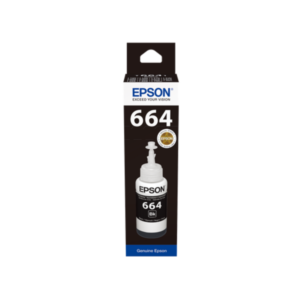
Compatible with: L100, L110, L200, L210, L300, L350 series
Capacity: 70ml per bottle
Page yield: ~4,000 pages (black), ~6,500 (color)
Best for: Home users with basic printing needs
Price: KSh 1,600 per bottle
This was Epson’s original EcoTank formulation. Reliable and affordable, but lacks the enhanced color vibrancy of newer series. Perfect if you primarily print documents rather than photos. Shop T6641 Black here.
103 Series (Mid-Range Consumer)
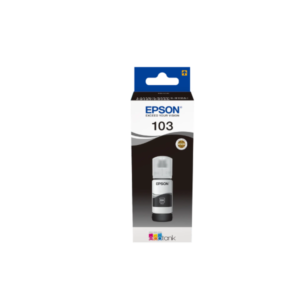
Compatible with: L3110, L3150, L3160
Capacity: 65ml per bottle
Page yield: ~3,800 pages (black), ~6,000 (color)
Best for: Home offices, students
Price: KSh 1,800 per bottle
Despite smaller capacity than T6641, the 103 series delivers sharper text and more accurate colors thanks to improved pigment formulation. The L3150—one of Kenya’s most popular EcoTanks—uses this series exclusively. Available in Black, Cyan, Magenta, and Yellow.
101 Series (Professional Grade)
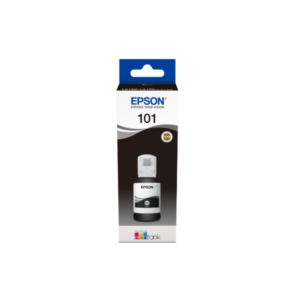
Compatible with: L4150, L4160, L6160, L6170, L6190
Capacity: 127ml (black), 70ml (colors)
Page yield: ~7,500 pages (black), ~6,000 (color)
Best for: Businesses, high-volume printing
Price: KSh 2,000 per bottle
The standout feature: nearly double black ink capacity. According to Epson Kenya specifications, this makes the 101 series the most economical choice for document-heavy offices. At KSh 0.27 per page, it significantly undercuts the 103 series (KSh 0.47 per page). Shop: 101 Black 127ml, Cyan, Magenta, Yellow.
108 Series (Photo Specialists)
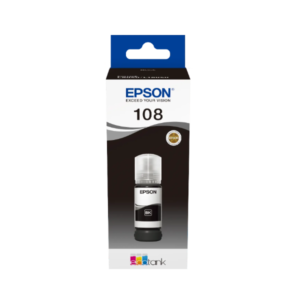
Compatible with: L3050, L3070, L15150, L15160
Capacity: 70ml per bottle (6 colors total)
Page yield: ~4,000 pages
Best for: Photo printing, graphic design, marketing materials
Price: KSh 2,500 per bottle
Unlike standard CMYK (4-color) systems, the 108 series includes Light Cyan and Light Magenta. These extra colors eliminate banding and deliver gallery-quality photo prints. Only necessary if photo quality is critical to your work. Available: Black, Cyan, Magenta, Yellow, Light Cyan, Light Magenta.
112 & 115 Series (Latest Generation)
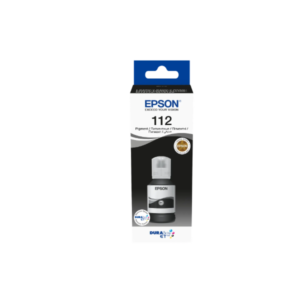
Compatible with: L5190, L5290 (112); L1250, L3250, L3260 (115)
Features: Enhanced fade resistance, faster drying times
Price: KSh 2,200-2,300 per bottle
Epson’s newest formulations prioritize longevity and speed. If you have one of these newer models, these series are your only compatible options—older inks won’t work properly. Shop 112 Black, 115 Black, and all colors.
Common Compatibility Questions
Can I use T6641 ink in an L3150 printer?
No. The L3150 requires 103 series ink. Using T6641 will cause:
- Poor print quality (faded colors, streaking)
- Potential print head damage
- Voided warranty
Each series is chemically matched to specific print head designs. Cross-compatibility doesn’t exist, even if bottles physically fit.
Can I mix different Epson ink series in one printer?
Absolutely not. Mixing formulations creates chemical reactions that:
- Clog ink channels
- Produce unpredictable colors
- Damage internal components
If you accidentally add wrong ink, do not turn on the printer. Contact Epson service immediately for guidance on flushing the system.
What if I can’t find my exact model in compatibility charts?
Check your printer’s user manual (usually available on Epson Kenya’s support page) or contact authorized dealers. At Techovant Solutions, we maintain a comprehensive compatibility database—call 0711258051 for instant answers.
Are third-party “compatible” inks safe?
Epson explicitly warns against third-party ink for EcoTank printers. These refillable systems are designed for Epson’s specific formulations. Third-party inks:
- Void your warranty immediately
- Often cause print head clogs within weeks
- May contain harsh chemicals that degrade internal components
- Rarely match Epson’s color accuracy
The KSh 400-600 “savings” isn’t worth the risk when genuine Epson ink already costs 80-90% less than traditional cartridge systems.
How to Order the Right Ink Every Time
Step 1: Verify Your Printer Model
Write down the exact model number (e.g., “L3150” not just “L3100 series”).
Step 2: Identify Required Series
Use the compatibility table above or check your printer manual.
Step 3: Decide on Single Bottles vs. Complete Sets
- Single bottles: Replace only the depleted color
- Complete sets: All 4 (or 6) colors at once—often includes modest bulk discounts
Tip: For first-time purchases or critical projects, buy complete sets to avoid mid-job color depletion.
Step 4: Purchase from Authorized Dealers
Only buy from verified sources to ensure authentic Epson products:
- Techovant Solutions (online with same-day Nairobi delivery)
- Epson-authorized service centers
- Established computer supply stores with verifiable authorization
Step 5: Verify Upon Delivery
Before opening packaging, check:
- Correct series number on label (e.g., “103” not “T6641”)
- Intact tamper-evident seals
- Holographic Epson logo
- Expiration date (should be 18-24 months from purchase)
Model-Specific Recommendations
For Epson L3150 Owners (Most Popular in Kenya)
Correct ink: 103 Series (Black, Cyan, Magenta, Yellow)
Cost per complete set: KSh 7,200 (4 bottles)
Expected duration: 6-12 months for typical home use (20-40 pages/week)
Cost per page: KSh 0.47 (black), KSh 0.30 (color)
Why it’s popular: The L3150 balances affordability with wireless printing and good quality—perfect for Kenyan homes and small businesses.
For Epson L4160 Owners (Business Favorite)
Correct ink: 101 Series
Cost per complete set: KSh 8,000 (4 bottles)
Expected duration: 12-18 months for moderate business use (100-200 pages/week)
Cost per page: KSh 0.27 (black), KSh 0.33 (color)
Why businesses choose it: The oversized black cartridge makes the L4160 ideal for document-heavy workflows. The low cost-per-page beats any cartridge printer and most competing EcoTanks.
For Epson L210 Owners (Budget Classic)
Correct ink: T6641-T6644 Series
Cost per complete set: KSh 6,400 (4 bottles)
Expected duration: 8-12 months for light use (10-30 pages/week)
Cost per page: KSh 0.40 (black), KSh 0.25 (color)
Why it endures: Though older, the L210 remains popular for its simplicity and affordability. If you have one, stick with it—the running costs are still excellent.
Warning Signs You’re Using Wrong Ink
If you experience these issues, check if you accidentally purchased incorrect ink:
- Faded prints despite full tanks: Wrong formulation can’t bond properly to paper
- Streaky or banded output: Incompatible ink viscosity clogs print heads
- Color shifting: Reds become orange, blues become purple
- Error messages about ink levels: Chip incompatibility with printer firmware
- Unusual odors during printing: Chemical reactions from mixed formulations
If this happens:
- Stop printing immediately
- Check ink bottle labels against your printer model
- If wrong ink confirmed, contact Epson service for professional cleaning
- Purchase correct genuine Epson cartridges
- Document everything for potential warranty claims
Cost Comparison: Buying the Right Ink Matters
| Scenario | Initial Cost | Lifetime Cost (2 Years) |
|---|---|---|
| L3150 with Correct 103 Ink | KSh 7,200 (set) | KSh 14,400 (2 sets) |
| L3150 with Wrong T6641 Ink | KSh 6,400 (set) | KSh 6,400 (ink) + KSh 4,000 (print head repair) + KSh 7,200 (correct replacement ink) = KSh 17,600 |
Using correct ink saves KSh 3,200 over two years—plus eliminates frustration and downtime.
What to Do If You’re Still Unsure
Compatibility confusion is common—you’re not alone. If this guide hasn’t clarified which ink you need:
- Call Techovant Solutions: 0711258051 (free compatibility check—no purchase required)
- Email your printer model: Include a photo of the model number if possible
- Check Epson’s official documentation: Epson Kenya support page
- Visit with your printer manual: Authorized dealers can cross-reference instantly
Never guess on compatibility—a 2-minute verification call prevents expensive mistakes.
Quick Checklist: Buying the Right Cartridge
Before completing any Epson ink purchase:
- ✓ Verified exact printer model number
- ✓ Cross-referenced compatibility with official chart
- ✓ Confirmed ink series matches printer requirements
- ✓ Purchasing from authorized dealer with genuine products
- ✓ Checked bottle labels match required series upon delivery
- ✓ Kept receipt for warranty purposes
Ready to Order?
Now that you know exactly which Epson cartridge works with your printer, shop with confidence. Browse our complete selection of genuine Epson ink organized by series, with clear compatibility information and competitive Kenya pricing.
Same-day delivery in Nairobi | Nationwide shipping | Expert compatibility support
Questions? Call 0711258051 or visit Techovant Solutions for personalized guidance from our Epson-certified team.
Note: Compatibility information accurate as of January 2026. Always verify with current documentation if purchasing for newly released printer models.


 No products in the cart.